Your bookmarks,
finally beautiful.
A visual new tab for every bookmark and tab you save. Save whole windows as sessions, find anything by what it was about, and keep it all in sync.
 Add to Chrome
Works in

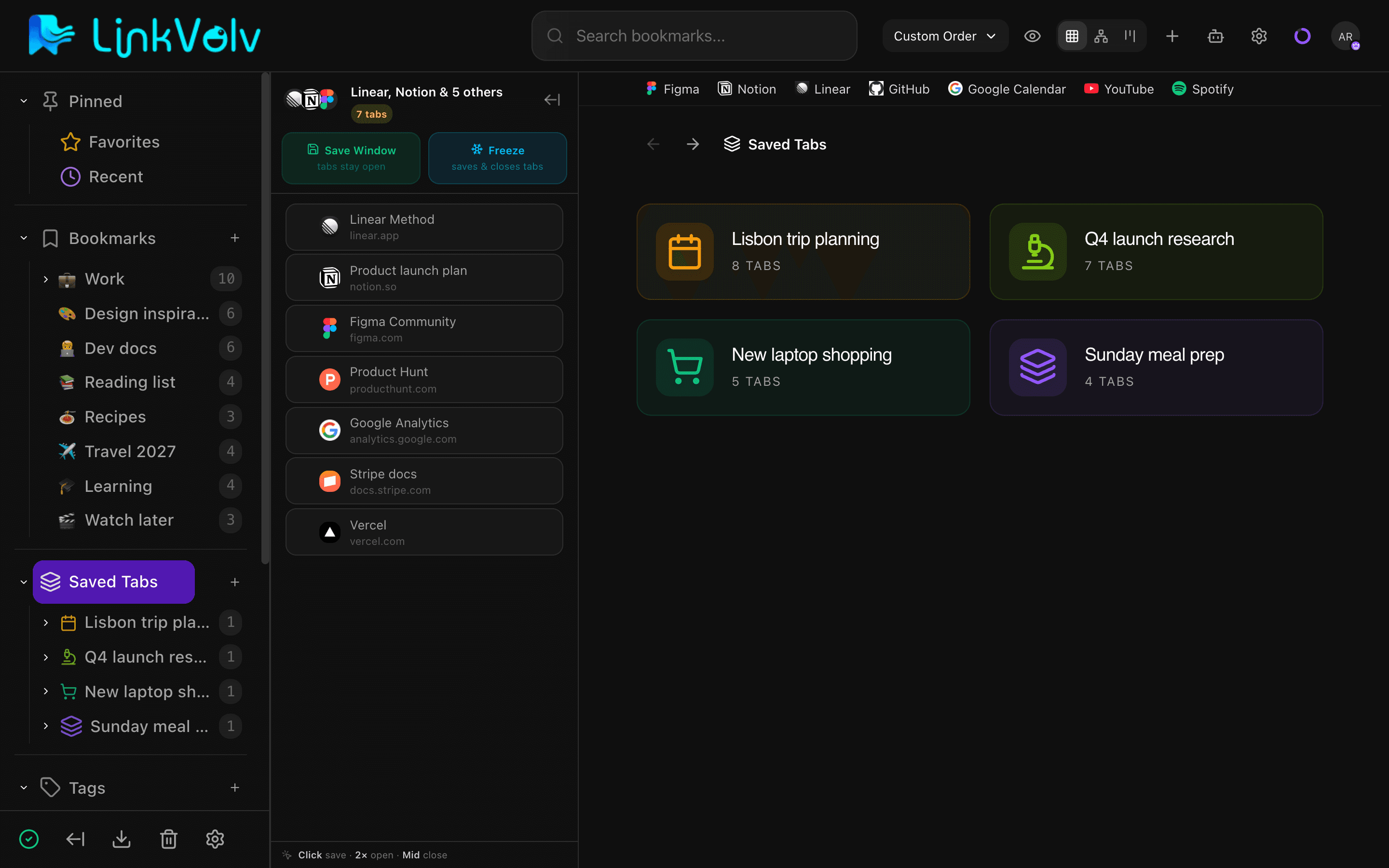
Close your tabs without losing them.
Save a whole window as a session in one click and reopen it any time, on any device. Your tab groups come back with it.
- Save Window keeps tabs open, Freeze saves and closes them
- Restore in this window or a new one
- Sessions sync across devices, free
- 100 saved tabs on the free plan
Make it yours.
Give every folder an icon, then see your library as a board, a grid or a tree. Light, dark, or whatever your system uses.
- Thousands of emoji and icons for folders
- Board, grid or tree: same library, one click
- A favorites bar for the sites you open every day
- Dark mode that follows your system
Find it, even when you forgot the name.
Search by what a page was about, ask your library a question, or get the gist without opening the link. AI never spends a credit without asking you first.
Your bookmarks come with you.
Import your browser bookmarks in one click, folders and all. Coming from somewhere else? Bring a file or a plain list of links.
- Straight from your browser, folder tree kept
- HTML, CSV, JSON or a plain list of links
- Pick which folders come in
- Export everything, anytime
Your Data. Your Rules.
We believe in transparency.
LinkVolv keeps your data secure on our servers with industry-standard protections.
Secure Sync
Your bookmarks sync securely across all your devices via our servers.
Your Data, Always
Export your bookmarks anytime. No lock-in, no tricks.
AI on Your Terms
AI runs only when you choose. Your library is never sold or used for ads.
Free to start. Pay only for more.
Free covers 1,000 bookmarks and search by meaning. Plus removes the limits and adds monthly AI; Pro adds chat with your library.
14-day full refund · Export any time · Your library stays if you downgrade
Free
No card needed
Save, organize and search your library. AI when you ask for it.
No credit card required
- 1,000 bookmarks
- 100 session tabs
- Search by meaning
- 20 AI credits to try summaries
- Import, export and 30-day trash
Plus
For your whole library
No limits, and AI every month.
Billed $39 yearly
- No limits on bookmarks, session tabs or smart filters
- 500 AI credits a month, about 500 summaries
- AI search and tag suggestions never cost credits
- Your own covers and cloud screenshots
Pro
Chat with your library
Ask a question and get answers with sources from your own bookmarks.
Billed $79 yearly
- Everything in Plus
- Chat with your library, with sources
- 1,000 AI credits a month
- A chat message costs 10 credits
A credit is one AI action: a summary is 1 credit, a chat message 10. Credits refill on the 1st of each month, and a failed AI action gives its credit back. Search and saving keep working at 0. What's a credit?
Questions, answered
Will I lose my bookmarks?
No. Importing copies your bookmarks into LinkVolv, folders and all, and leaves the ones in your browser as they are. Anything you delete sits in the trash for 30 days, and you can export your whole library any time.
Does it work with tab groups?
Yes. Save a window and its tab groups are saved with it, names and colors included. Restore it and the groups come back.
What’s in Free?
1,000 bookmarks, 100 saved tabs, sync across devices, search by meaning, import and export, and 20 AI credits to try summaries. No card needed.
Can I export my library?
Yes, on every plan: a JSON file with everything, or a standard bookmarks HTML file any browser can import.
Which browsers does it work in?
The extension works in Chrome, Edge and Brave. Other Chromium browsers, such as Vivaldi and Opera, add it from the Chrome Web Store too (Opera first asks for its Install Chrome Extensions add-on). In Firefox, Safari and any other browser, use the web app.
Is there a phone app?
Not yet. LinkVolv is made for computers today: the extension, the web app at app.linkvolv.com and the desktop app. The web app opens in a phone browser, but it isn’t laid out for small screens yet.
What happens if I downgrade?
Your library stays: bookmarks, saved tabs, saved page text and images. Only new saves past the Free limits stop until you’re back under them or upgrade again.
Will AI spend my credits without asking?
No. On Free, credits are spent only when you press a button. On Plus and Pro you choose whether AI runs on its own or only when you click, and you can pause it any time.
Close your tabs. Keep everything.
Start on Free. Move to Plus when you outgrow it, or Pro to chat with your library. Your library stays if you ever downgrade.